Wifi on board

Iberia offers a WiFi service on 96% of its aircraft so you can stay connected at all times. 

You can choose from two WiFi options:

  • Free connectivity for messaging apps, such as WhatsApp, Messenger and Telegram. A free service throughout the flight for customers travelling in the Business cabin, Iberia Club members and anyone who registers with the programme during the flight. You'll find exclusive access to this service on the WiFi portal. If you're a member of Iberia Club, it's very important that you remember your password. Otherwise, you won't be able to use this service or reset your password during the flight.

  • Payment packages for internet browsing, streaming, email, messaging, and downloading and sending documents. 
How do I connect?

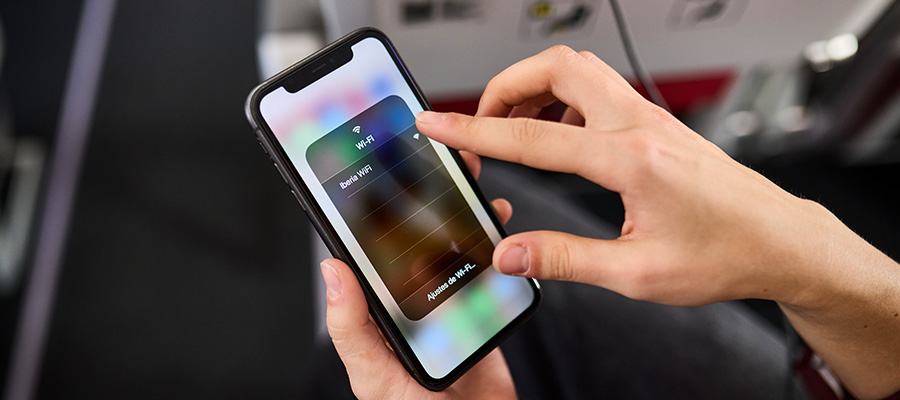
  • Enable Flight Mode on your device.

  • Select the Iberia WiFi network.

  • Once you have connected to the "Iberia WiFi" network, the captive portal will open automatically to facilitate access to the service. If this doesn't happen, you can also connect by scanning the QR code you'll find on your seat or by typing shop.iberia.com in your web browser.

​Fares

The rates will depend on the route and the type of plane in which you are travelling. Connect once you are on board and decide the best plan for your needs. If you buy a browsing package, you'll receive the invoice at the email address you entered when you made your purchase. Here are the browsing plans you can enjoy during the flight:

  • Messaging all flight: Free for Business and IB Plus customers

  • Messaging 1 hour: €3.49

  • Messaging all flight: €3.49–€5.99

  • Browse and Streaming 1 hour: €5.99

  • Browse and Streaming 4 hours: €13.49

  • Browse and Streaming all flight: €5.99–€24.99

Coverage

The service has global coverage, with a satellite or ground connection, it is possible that for some moments during the flight the signal is weak. Additionaly, we have 3 different providers for connectivity in our fleet, so you may experience differences between one flight or another.

We answer frequently asked questions

I'm a member of Iberia Club. How do I connect to the free messaging service during my flight?

  1. Once you have connected to the WiFi portal, locate the banner "Travelling in the Business cabin or an Iberia Club member?" and click "Connect here".

  2. Select the "Sign in with Iberia Club" button.

  3. Enter your email address or your Iberia Club number and your password (your Iberia Club password must be active and valid before you board).

  4. It will take a few seconds to establish the connection until your registration is completed. You may see the Start image for a few seconds. If so, please wait without performing any action.

  5. Once the connection has been established, select “Start”.  

  6. Now go ahead and enjoy the service.

How do I connect to the free messaging service during my flight if I'm travelling in Business class?

  1. Once you have connected to the WiFi portal, locate the banner "Travelling in the Business cabin or an Iberia Club member?" and click "Connect here".
  2. Select the "Log in with booking details" button.

  3. Enter your seat number and surname, as shown in your booking.

  4. On some flights you will have to fill in your full name and email again.

  5. Click "Start".

  6. Now go ahead and enjoy the service.

What do I need to have free wifi for messaging during my flight?

You must travel in Business class or belong to the Iberia Club loyalty program. You will need to your Iberia Club number or your registration email in the program and your password.

It is very important that you remember your password before starting your flight, and that you check it is updated, otherwise you will not be able to use this service.

Can I send files with my messages?

The free messaging service is valid for sending text messages only, but you can purchase the wifi plan that best suits your needs so that you can send files or images.

If I have free messaging, how can I also browse the internet or send files or emails?

  1. On the Wifi portal, click the "Upgrade" button.
  2. Select the package that best suits your needs and click "Continue with payment".
  3. Enter your credit card details.

  4. You’re now connected.

Can I reset my password during the flight?

It is not possible to reset the password during the flight, we recommend that you check that you know your password before travelling:

  1. Go to Iberia Club website.
  2. Click on Access.

  3. Complete your Iberia Club number or the mail associated with your Iberia Club account (if you have more than one account associated to your mail, you will have to use the Iberia Club number). 

  4. You will receive a mail with the instructions of how to reset your password.

  5. In case you have troubles with accesing, please contact the team throught the following link: https://contacto.iberia.com/

How can I check that my password and access to the program are active?

To check that your password is active, you must visit our website iberia.com or our Iberia app on your smartphone and try to access your account with your Iberia Club number or email as user and with your password. If you manage to access your account, your password works correctly, if not you must follow the steps indicated in the previous question to reset it.

What happens if my password is blocked during my trip?

In case of password blocking during the trip, you will have to wait until the end of the flight to be able to reset your password.

Can I register with the Iberia Club programme during the flight?

  1. Once you have connected to the WiFi portal, locate the banner "Travelling in the Business cabin or an Iberia Club member?" and click "Connect here".

  2. Select "Register now" and you will be redirected to Iberia Club registration.

  3. Once you have completed the registration, go back to the WiFi portal with the QR code or by typing shop.iberia.com in your web browser.

  4. Use your credentials (email and password) to access the free WiFi service for messaging. 

  5. Now go ahead and enjoy the service.

How is the service paid for?

Just entering your credit card details as detailed in the purchase process in the Iberia wifi portal.

How do monitor my WiFi usage time?

You can check the WiFi portal homepage at any time to see the remaining connection time for the package you have purchased.

Contact details

You can contact Iberia Customer Service for more information about the service.

Loading...